
Library Web Page Requirements
Known Database Access Connection Problems
New Paltz Campus User ID and Password
Your campus user ID is now the same as your, @newpaltz.edu, email address. Some letters from your name and sometimes a number then add @newpaltz.edu.
like: blergek7@newpaltz.edu If you were the seventh student named K. Blergendorfer to register.
Your password is the same password as all other services
Campus information about your Campus User ID.
The exception to this rule is: Library Public PCs and Campus Lab PC login
PC login uses the user ID that precedes “@” in your campus email address. So the previous example would be, blergek7, as the complete user ID at the PC login screen.
To get help with your user ID and password:
STUDENTS: Contact the Student Help Desk at 845-257-4357 or visit them at HUM 103.
FACULTY AND STAFF: Contact Computer Services: HAB 50, (845) 257-3130.
Some PC Security Software Blocks Login to Our Databases
Some security software in the past has prevented library users from logging into our databases and ILL service. These generally have web control components that install into your web browsers. Security suites that have done this in the past are CA PC Security Suite and Bitdefender.
To correct this some patrons have had to turn off their firewall to use the library databases while others have reported that they had to change or disable settings called web browser security and or web access control in their security software.
The EZproxy error at database login
If you receive the following error when connecting to a database:
Contact us so we can fix it, be sure to let us know what database you were trying to use.
You can submit any technical questions to our technical help form at this link.
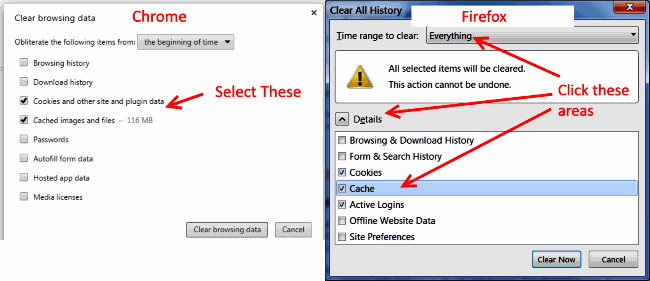
Clearing your browser cache & cookies
There are some quick techniques with most modern browsers, but the browser then must be turned off and closed. If your on a Mac you have to fully quit a program. (I always recommend you reboot after clearing cache.)
Reload the page and request the latest data from the web server keyboard shortcut
NOTE: This is not clearing cache but in many cases fixes small problems relating to cached data.
- Press CTRL + F5 keys at the same time with the page you need on your browser screen.
- If using a Mac press: Apple + R OR command + R
(Holding the shift key while pressing reload in the browser multiple times may also work)
Clear cache through browser settings keyboard shortcut
- CRTL + SHIFT + DEL on a PC
- Shift+Command+Delete on a MAC
NOTE: Make sure History and Cookies and cached images and files is selected and/or time range is set to “All time” when the dialog box pops up and click OK.
Cache settings can also be found in your browser settings through the menu through Settings and Privacy.
NOTE: Again, the browser then must be turned off and closed. If on a Mac you have to fully quit a program.
Web Browser Requirements
Mozilla Firefox, Google Chrome
We primarily support Mozilla Firefox, Google Chrome on our web page, but most up-to-date browsers will work.
We recommend you have more than one fully up-to-date web browser so if you run into something that does not work in one you can try the other. This is sometimes the quickest fix.
Download a New Browser
Safe download links:
Web Browser Settings
- JavaScript must be enabled for most of our sites and research databases
- Cookies must be enabled because many library research databases use cookies
- Java Runtime should not be enabled as a general rule, BUT some library database sites may require Java Runtime software enabled in your browser. If so, the database will give you a message that says it is required. Here are instructions on how to Enable and Disable Java in your browser.
If YOUR configuration is different from the recommended software and settings, you may experience difficulty using the Library’s electronic resources.
Pop-up Blocker Settings
Many pop-up blockers are smart enough to allow pop ups from trustworthy sites like our databases. If one is blocked you will get a warning from your web browser and it will allow you to make an exception for that database web site.
If that still gives you too much trouble though, you will have to turn off your pop-up blocker while doing research with the library databases. You can turn it back on when you are done, of course.
Essential Software you Need to Access Content on the Web
It is always recommended to get the latest version of the following software to view documents and media content on the web.
Adobe Acrobat
Acrobat PDF (Portable Document Format) files are all over the web they used to distribute documents. There are other PDF viewers, but you should have the Acrobat viewer. Our library reserves are mostly in PDF format.

Java Runtime Environment is not recommended
Java Runtime is not Javascript and it is no longer recommended to be enabled in your web browser. However, if you need Java Runtime for a specific site, here is a safe link:
Recommended Software
Adblock Plus
Surf the web more securely & without annoying ads!
-
Can block tracking, malware domains, banners, pop-ups, and video ads – even on Facebook and YouTube
-
Unobtrusive ads that support websites aren’t blocked
- It’s free!
- Get Adblock PLUS
Microsoft Silverlight
Microsoft Silverlight is Microsoft’s answer to Adobe Flash. Because it is backed by Microsoft you can be sure pages at Microsoft will use it and some other places will adopt it. Don’t worry about Adobe Flash though, they are the most used moving image display software by far.
Other Video Players
QuickTime is the original Apple computing video format, and some videos can only be viewed with QuickTime Player